Your track map just got a proper upgrade
Race Ninja's Track Map overlay now lets you control line thickness, dot size, colours, start/finish line markers trace borders and dot borders. The editor preview shows your real GPS trace from your fastest lap, and you can toggle a Google Maps satellite background underneath your racing line.
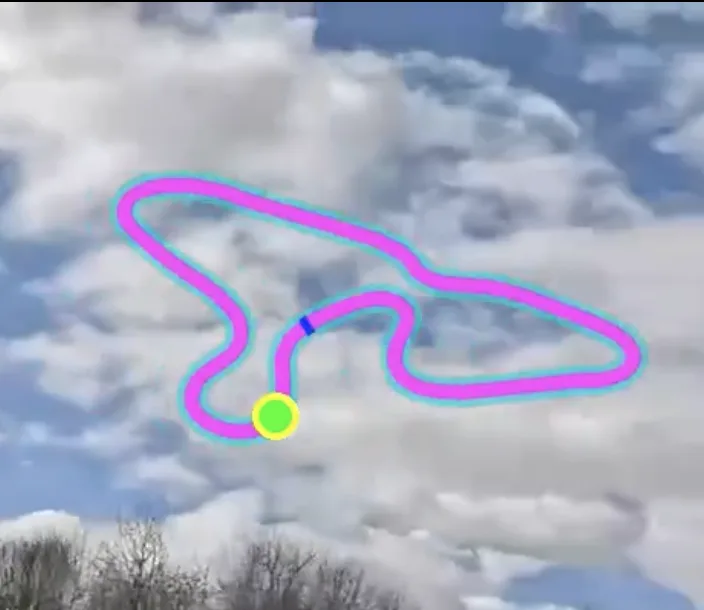
The Track Map overlay in the Video Editor now gives you full control over how your racing line looks on screen. You can tweak the line thickness, change the dot size, pick your colours and even toggle a Google Maps satellite view underneath it all.
But here's the bit we're most pleased with.
The preview in the editor now shows your actual GPS trace from your fastest lap. Not some placeholder shape. Your track, your line, your corners. What you see in the editor is what you get in the render.
We've also added two new options. A start/finish line marker that sits across the track at your first GPS point, with its own colour and thickness controls. And a trace border that wraps around the outside of your racing line to make it pop against busy backgrounds.
The rendering quality got a bump too. Lines are anti-aliased and smooth now, no more pixelated edges or gaps at tight corners.
Here's the full list of what you can control:
- Line thickness and colour
- Position dot size, shape and colour
- Start/finish line with colour and width
- Trace border with colour, width and opacity
- Dot border with colour and width
- Google Maps satellite or road map background
- Background colour and item border
Head to the Video Editor tab on any analysis result to try it out. Enable Track Map in the overlay list and you'll see all the new controls right there.
Big thanks to Brad for suggesting this one. Most of the features you see here came directly from his feedback, and it's a good reminder that the best ideas often come from the people actually using the tool at the track.
Got an idea for an overlay feature you'd love to see? We're all ears. Raise a ticket through the support link in your dashboard and tell us what you want on your videos. We can't promise everything, but we'll do our best to make it happen.
0 Comments
Sign in to join the conversation.
Sign InNo comments yet. Be the first to share your thoughts.
More Articles

Tag us in your next video and we'll put it on Race Ninja
Racing on YouTube? Show or mention Race Ninja in your next upload and it can land on our Featured page, with a link straight back to your channel.

The Race Ninja app is open. Your phone carries the footage, we do the thinking
The Race Ninja app for iPhone, iPad and Apple silicon Macs is open to everyone through TestFlight. It shrinks your footage in the paddock, sends it up, and your analysis comes back in about a minute a lap.

The data always told the story. Now Race Ninja reads it to you
Every chart on the results page now has a plain-language summary. What changed and what to do about it. No spreadsheet required.