Head to Head. Two Laps. Side by Side. Every Difference Exposed
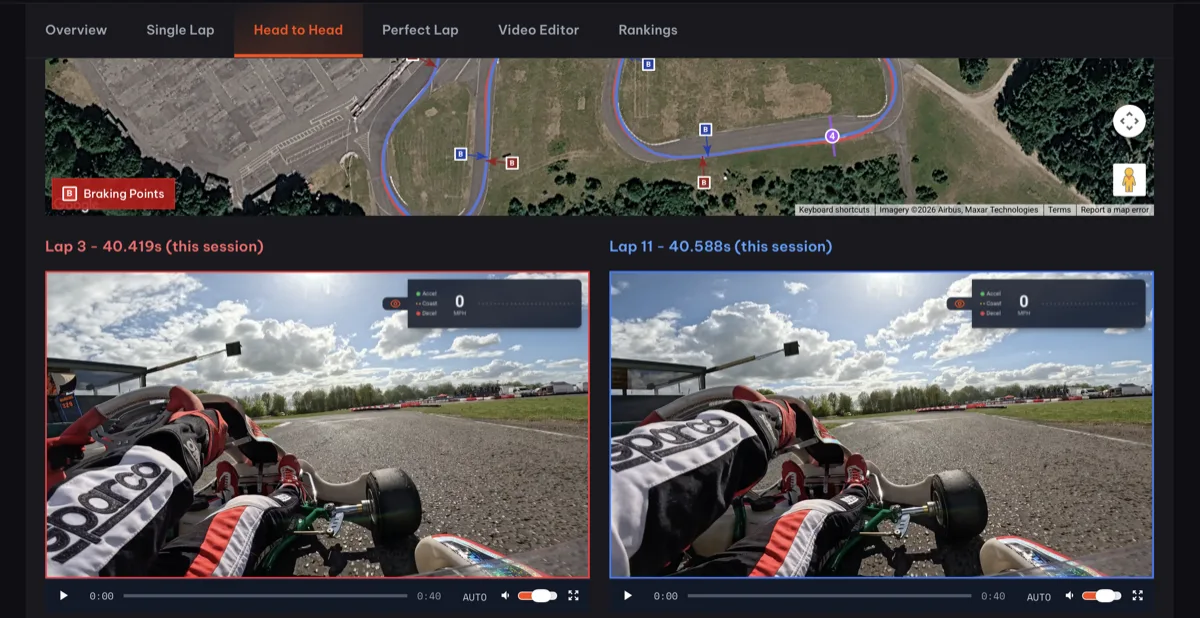
Head to Head plays any two laps side by side with synchronised video and telemetry. Two laps can feel identical from the seat but Head to Head shows you they weren't even close. A later brake here, more speed there. The data sees things you can't feel.
This is one of my favourite features in Race Ninja.
Pick any two laps from your session. Head to Head plays them side by side with synchronised video and telemetry. You see exactly where one lap gained over the other. Where you braked earlier. Where you carried more speed. Where that tenth was hiding.
The thing about driving is that two laps can feel identical from the seat. You come in and think "those were pretty similar." Head to Head shows you they weren't. Not even close. A slightly later brake here, a wider entry there, a fraction more speed through the apex. Tiny differences that you'd never feel but the data sees all of it.
This is how you stop chasing feelings and start chasing facts.
For us it's become part of the race day routine. Compare your best lap to your second best. Find out what made one quicker. Then go and repeat it. Or compare your first session to your last and see exactly what improved and what didn't. It's all there.
Combined with Perfect Lap, which stitches your fastest sectors into one theoretical best, you've got a complete picture of where your time is. Head to Head shows you the detail. Perfect Lap shows you the target.
No expensive data logging needed to get started. Just your GoPro or DJI footage and Race Ninja does the rest. And if you run an AiM or dashboard alongside, that data layers in too.
Frequently Asked Questions
How do you compare two laps side by side?
What's the difference between Head to Head and Perfect Lap?
Can you compare laps from different sessions?
0 Comments
Sign in to join the conversation.
Sign InNo comments yet. Be the first to share your thoughts.
More Articles

Tag us in your next video and we'll put it on Race Ninja
Racing on YouTube? Show or mention Race Ninja in your next upload and it can land on our Featured page, with a link straight back to your channel.

The Race Ninja app is open. Your phone carries the footage, we do the thinking
The Race Ninja app for iPhone, iPad and Apple silicon Macs is open to everyone through TestFlight. It shrinks your footage in the paddock, sends it up, and your analysis comes back in about a minute a lap.

GoPro Cloud links are importing again, chapters and all
GoPro Cloud share link imports have been broken since early August. They work again from today, and long sessions that split into chapters now come across as one analysis.